


Most conversations about becoming more productive as a tester quickly end up talking about automation frameworks, CI/CD pipelines, or test execution.
Those things matter.
But some of the biggest improvements I’ve made had nothing to do with automated tests.
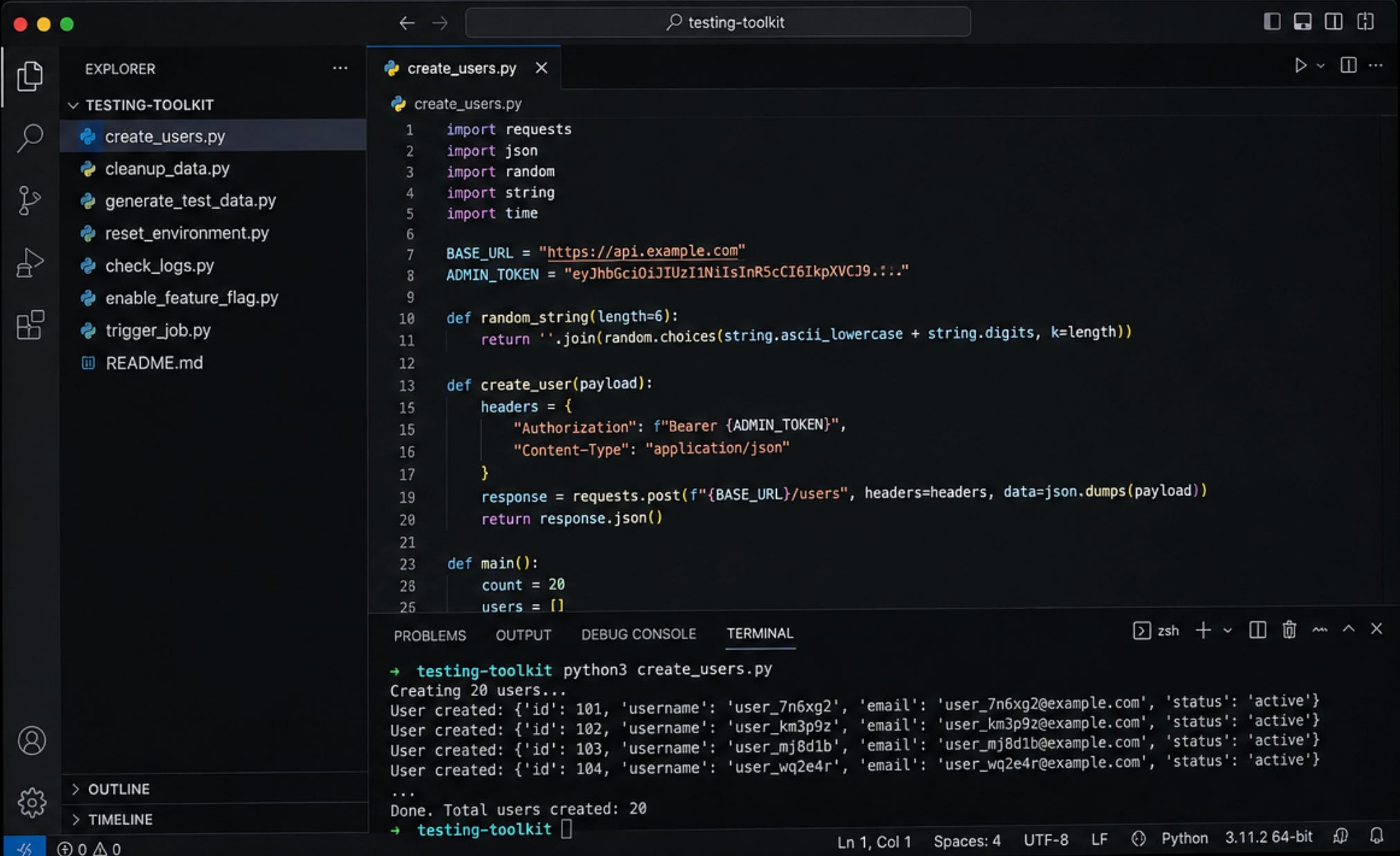
Instead, they came from building my own testing toolkit.
Not a framework.
Not a fancy application.
Just a collection of small scripts that removed repetitive work from my day.
These scripts never tested the product.
They helped me test the product better.
We Spend More Time Preparing Than We Realize
When I joined a new project, I noticed something.
Before I could even begin exploring the product, I spent a surprising amount of time preparing for testing.
I had to create test users.
Assign permissions.
Generate test data.
Configure servers.
Enable feature flags.
Reset environments.
Clean old records.
Inspect logs.
Restart services.
Delete temporary data from previous testing sessions.
None of these activities helped me learn about the product.
They were necessary.
But they were repetitive.
And together, they quietly consumed a large part of my day.
The Hidden Cost of Repetitive Work
Many teams think about testing in terms of execution.
But execution isn’t always where our time disappears.
A lot of it disappears before testing even begins.
Imagine spending thirty minutes (sometimes more) preparing data before every exploratory testing session.
Do that twice a day.
That’s one hour every day.
Five hours every week.
More than twenty hours every month.
Nearly three working days spent preparing instead of testing.
That doesn’t feel like a good trade.
So I Started Building My Own Toolkit
Whenever I found myself repeating the same task over and over, I asked myself one question.
If the answer was YES, I wrote a small script.
Nothing complicated.
Just a simple Python script that solved one problem.
Then another.
And another.
Over time, those small utilities became my personal testing toolkit.
What Was Inside My Toolkit?
It wasn’t one big application.
It was simply a folder full of scripts that solved everyday problems.
Some scripts created hundreds of users.
Some generated realistic test data.
Others cleaned old records after testing.
Some prepared databases.
Some checked backend configuration.
Some collected logs.
Some enabled feature flags.
Some triggered scheduled jobs.
Some reset environments.
Each script solved one small problem.
Together, they saved hours.
This Isn’t Test Automation
This is the part I think many people misunderstand.
None of these scripts tested the product.
They didn’t verify functionality.
They didn’t execute test cases.
They didn’t run inside CI/CD.
Instead, they removed friction around testing.
There is a difference between automating testing and automating the work that surrounds testing.
Both are useful.
But they solve different problems.
A Simple Example
Imagine you’re testing a permission system.
You need twenty users.
Each user needs different roles.
Different departments.
Different account states.
Creating all of that manually might take twenty minutes.
Running one script takes less than a minute.
Those nineteen extra minutes can now be spent exploring the product instead of preparing it.
That’s where real testing happens.
The Language Doesn’t Matter
I used Python because it was simple and familiar.
Someone else might use Bash.
PowerShell.
JavaScript.
Go.
Java.
It doesn’t matter.
The language isn’t the point.
The goal is to remove repetitive work that gets in the way of testing.
Something Unexpected Happened
As my toolkit grew, my teammates became interested.
Eventually someone would ask,
“Can you share that script?”
Then another person.
Then another.
Something I built for myself slowly became useful for the team.
New testers could prepare environments faster.
Data creation became consistent.
Cleanup became easier.
Everyone spent less time doing repetitive work.
Your Toolkit Needs Maintenance Too
Like any software, a testing toolkit needs attention.
Products change.
APIs change.
Database schemas change.
Configuration changes.
A script that worked six months ago might no longer work today.
Or worse, it might still run while producing incorrect results.
That’s why I reviewed my scripts regularly.
If something no longer reflected reality, I updated it or removed it.
A toolkit should reduce friction, not create new problems.
Build It One Script at a Time
Don’t try to build an entire toolkit over a weekend.
Start with the task that annoys you the most.
The one you repeat every day.
Solve that problem first.
Then move to the next one.
After a few months, you’ll be surprised how much time you’ve recovered.
Three Things I’d Recommend
1. Start with repetitive work
Don’t automate something because it looks impressive.
Automate the work you repeat every week.
2. Keep each script simple
One script.
One purpose.
Simple utilities are easier to understand and maintain.
3. Treat your toolkit like any other software
Keep it under version control.
Add simple documentation.
Review it occasionally.
Remove scripts that no longer make sense.
Final Thoughts
Testing isn’t only about interacting with software.
It’s also about creating an environment where you can spend more time learning about the product.
My testing toolkit never found a single bug.
It never executed a test case.
It never appeared in a dashboard.
But it gave me something far more important.
Time.
Time to explore.
Time to ask better questions.
Time to investigate the things that actually mattered.
The best automation isn’t always the automation that tests the product.
Sometimes it’s the automation that gives the tester more time to think.
Further Reading
If you found this useful, you might also enjoy these articles:


If you found this helpful, stay connected with Life of QA for more real-world testing experiences, tips, and lessons from the journey!